Shot Page
Shot Page
 |
|---|
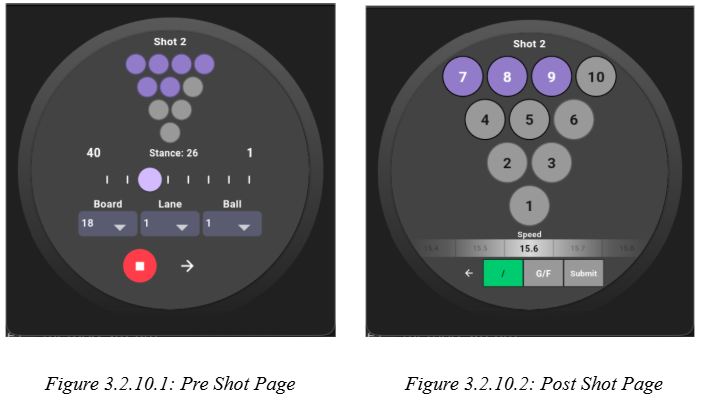
The Shot Page is the primary user interface for collecting both pre shot and post shot information for each throw. It is a stateful widget that manages the interactive controls to construct a complete shot model. The whole page is driven by the Phase enum which switches the UI between pre shot and post shot modes based on the user’s progression through their shot. During initialization, the page loads the incoming state such as the initial pins, lane, board, ball and speed values so that data can persist across multiple shots within the same frame unless changed. This includes copying the initial pin layout into a list currentPinState. In the pre shot phase, the UI shows a non-interactive pin layout followed by the stance slider and three dropdowns for board, lane, and ball selection. The stance slider is wrapped inside a tick-mark CustomPaint overlay, allowing the user to select from 1-40. The record button and next phase button are on the bottom of the screen, allowing the user to move to the next phase after the shot is thrown. In the post shot phase the pin grid becomes interactive, users can tap pins to toggle their state, and buttons for strikes, spares, fouls and gutter balls. The strike/spare button switches between “X” and “/” depending on whether the shot is the first or second attempt within the frame. Foul and gutter actions are handled through a pop up menu, and the ball speed selector is a horizontal scroll picker to fit the watch. The button row at the bottom of the post phase provides navigation back to the previous page if the user were in need of editing details from the pre phase, and a submit button that triggers _submitShot().