Shot Page
Shot Page
 |
|---|
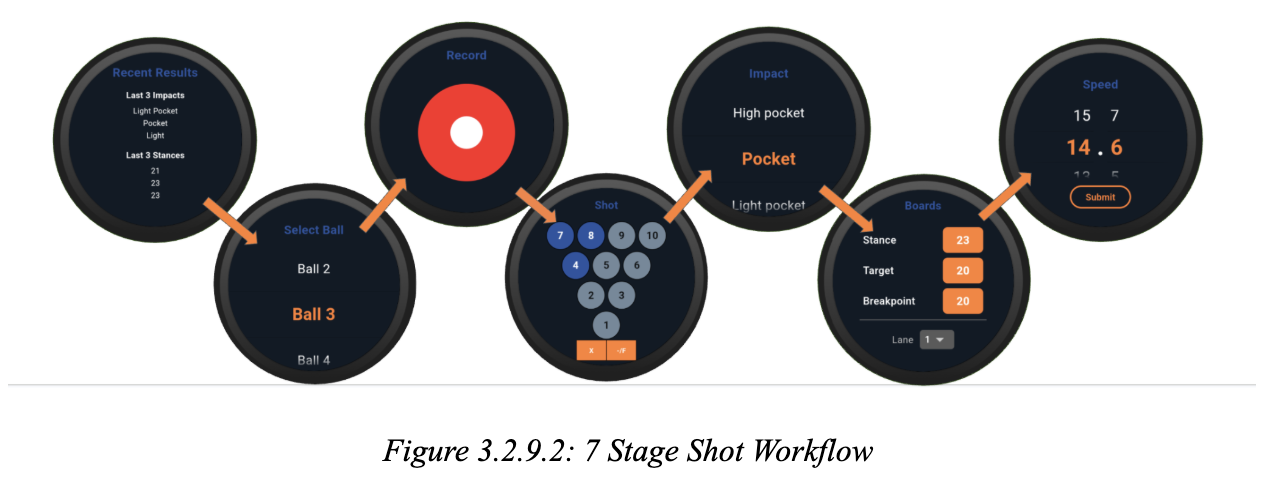
The Shot Input Page implements a structured, seven-stage workflow for capturing all relevant data for a bowling shot, using an interface managed by a PageController. Each stage corresponds to a distinct aspect of shot entry, as defined by the titles list: (1) Recent Results, (2) Select Ball, (3) Record, (4) Shot, (5) Impact, (6) Boards, and (7) Speed. The workflow, shown in Figure 3.2.8.2, is realized as a sequence of interactive pages, each with its own state and validation logic. The Recent Results stage displays a summary of the last three shots, leveraging helper methods to extract and format impact and stance labels from recent shot data. The Select Ball stage allows the user to choose from available balls, with logic to ensure the selected ball is valid and falls back to a default if necessary. The Record stage manages the actual shot recording process. The Shot stage provides a visual interface for selecting which pins remain standing, using a custom pin display widget, outcome toggling (strike, spare, foul), and foul handling, with pin toggling logic that respects the context of the shot (first or second shot in the frame).. The Impact and Boards stages use custom wheel pickers and dialogs to allow precise selection of impact board and stance, with dynamic label computation and recent value recall. The Speed stage employs a scrollable picker for ball speed, with snapping and real-time updates. Throughout the workflow, state is tightly managed and synchronized, with each stage initializing from the provided context and updating the shot model as the user progresses. This stage-based design ensures user-friendly shot data entry, supporting both manual and post-shot workflows and integrating seamlessly with the broader session and BLE transmission logic.