Mobile Application
What is the mobile application?
The Mobile Application is a cross-platform system designed to collect, organize, and analyze a wide range of bowling metrics. Users can create and manage events they are competing in, add the establishments where they bowl, and create sessions that link directly to both an event and an establishment. From each session, users can add games, which contain all associated shot and frame data. Selecting a specific game opens an interactive pin layout interface where the user records pins left for each shot. Once submitted, the application displays the full sequence of shots and frames for immediate review. The application also includes a Bluetooth interface for optionally connecting to the SmartDot module, enabling real-time collection of accelerometer, gyroscope, magnetometer, and light sensor data. Additionally, the app supports integration with a Smart Watch companion app, allowing users to pair their watch for extended functionality. A cloud synchronization feature enables users to store and access their data across devices. The statistics page provides tools to search across all events, sessions, games, frames, and shots, giving users detailed performance insights to support skill development and improvement.
Mobile Application Architecture
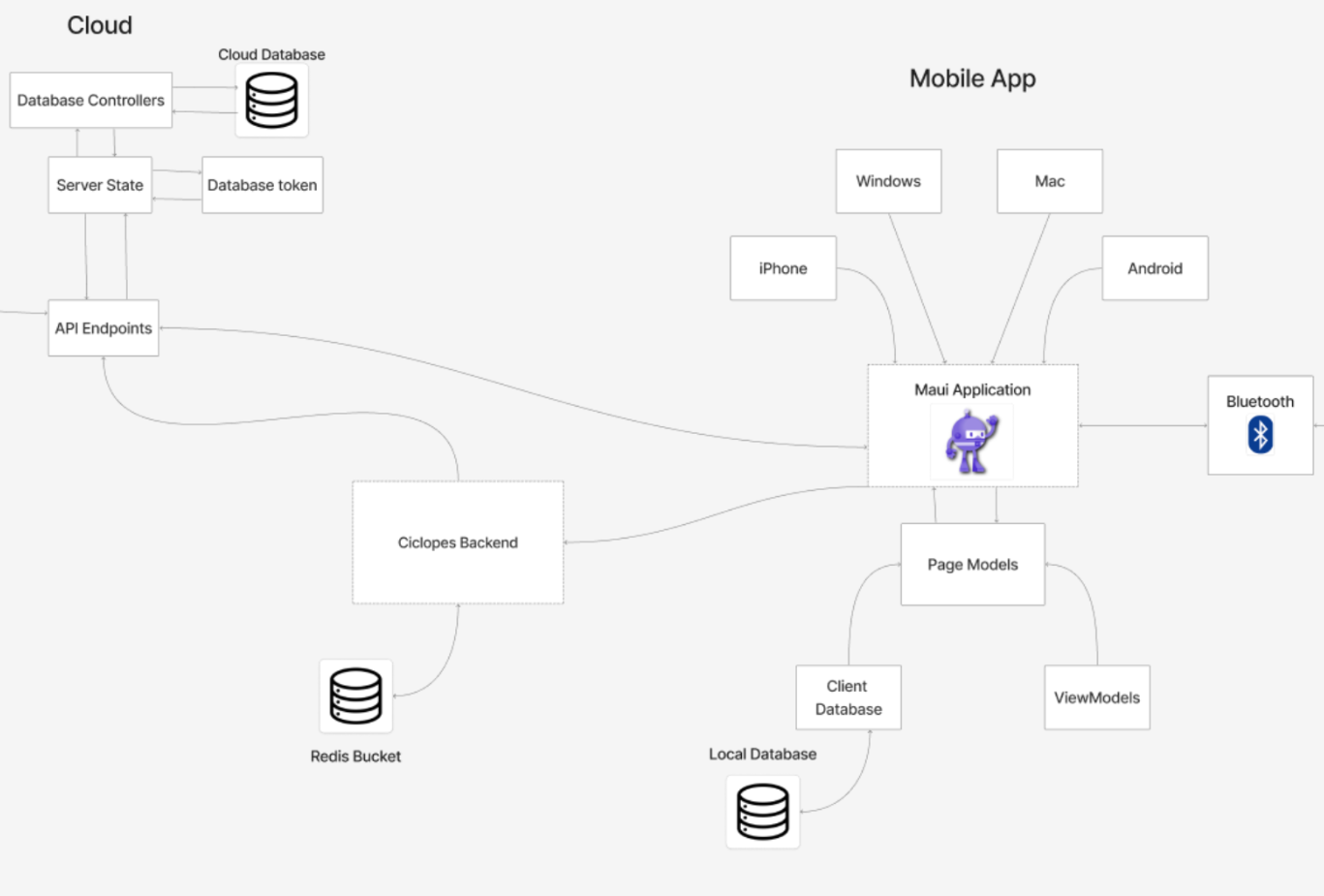
The Mobile Application is built using .NET MAUI, enabling a single C# codebase to be compiled for Windows, macOS, Android, and iOS. This supports a unified development workflow while delivering native applications on all major user platforms. As illustrated in the diagram below and modeled in the system’s Component UML Diagram, the application consists of a MAUI-based frontend and a local persistence layer implemented using SQLite. All user-generated data is stored locally by default, with an optional synchronization workflow that sends data to the cloud through API endpoints hosted on the DigitalOcean API Server. The Deployment UML Diagram further shows two external device interfaces: a MetaMotion S sensor module and a Smart Watch, both of which connect to the mobile application through its Bluetooth communication component.
| Mobile App - High Level Overview |
|---|
|
App Pages
- Main Page
Default home page
- Login
Login to the app
- Registration
Create an account
- Ciclopes Page
Access the Ciclopes software
- Ball Arsenal
Mobile Application
- Establishment Page
Track Bowling Establishments
- Event Page
Manage events
- Session Page
Manage sessions and games
- Shot Page
Shot input
- Stats
Bowling statistics
- Account
User information